RBAC: turning permission slugs into product experiences
Users don't experience backend permissions — they experience the interface those permissions create. This is how a permission model was translated into consistent, hide-not-disable UX across six product domains, then taken into production.
6 domains mapped· 4 capability types· 4 profiles in the prototype· 0 UX blockers raised during build
Overview
Role-Based Access Control determines what users can access and what actions they can perform. In the Data Integrity Suite, permissions are defined at the backend through permission slugs — the frontend's job is to translate those into a clear, consistent user experience.
The work was to define how permissions should translate into UX across the product, build a working prototype to demonstrate the behaviour, and then carry the validated patterns into production.
The Challenge
RBAC sounds simple until the same permission model has to hold up across multiple, very different product experiences. A permission that maps neatly to one screen can have a completely different UX implication in another.
The question: when a user has a particular set of permissions, what should they actually see and be able to do?
Domains covered
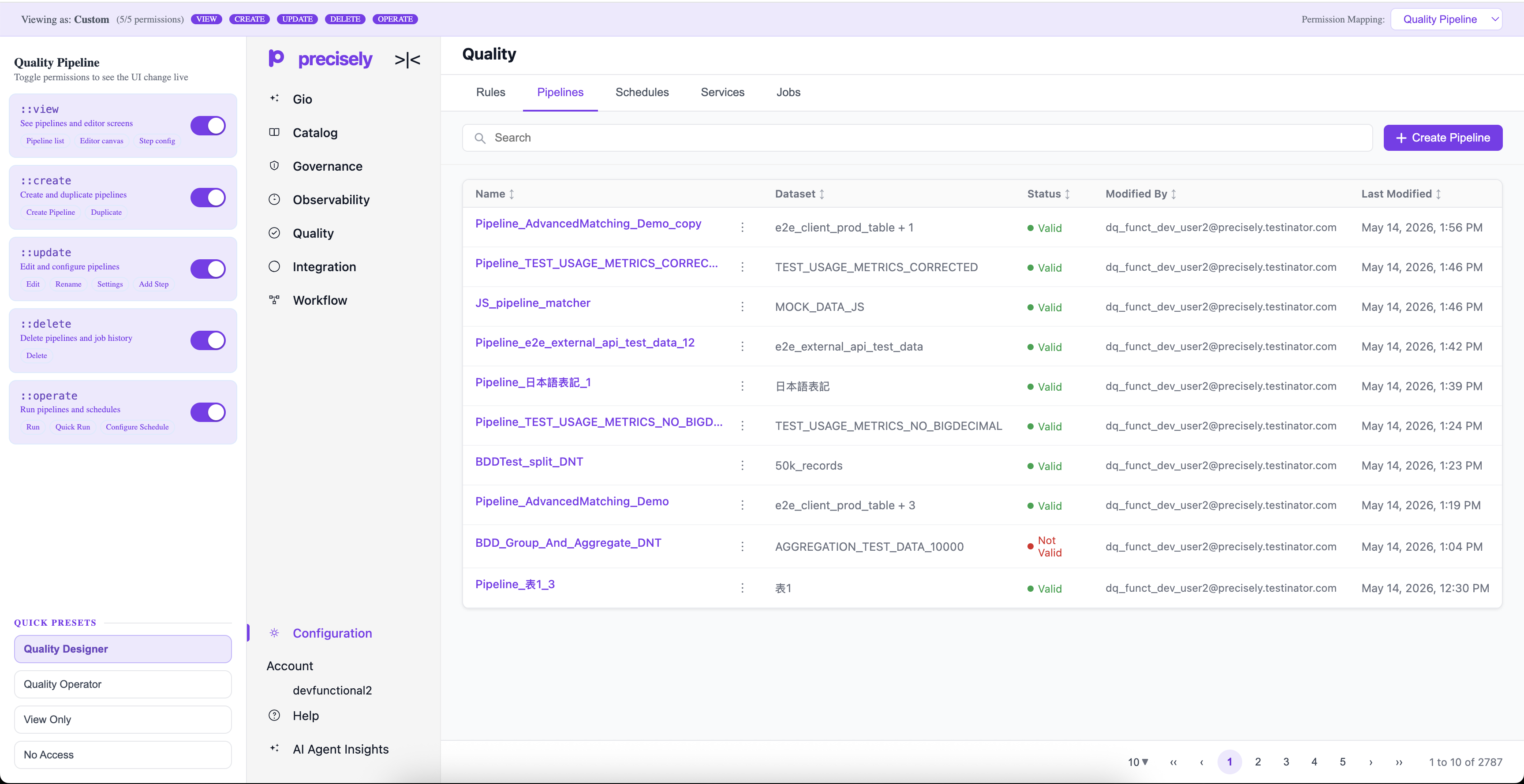
Quality Pipeline, Quality Rules, Observer, Runtime Engine, Profile, API Source
Key challenges in Quality Pipeline specifically
- Side panels, configuration, and settings that all carry their own permission logic
- Multiple actions and operational controls at different access levels
- An experience that still had to remain visible to View Only users
The goal was never to redesign the permission architecture — it was to build a consistent UX layer between backend-defined permissions and what the user actually experiences.
Solution
The approach was to treat this as a translation layer: backend permission → user capability → frontend behaviour → visible actions. Every permission mapped to one of four capability types — View, Create, Update, Delete — plus Operate for domains with runnable actions.
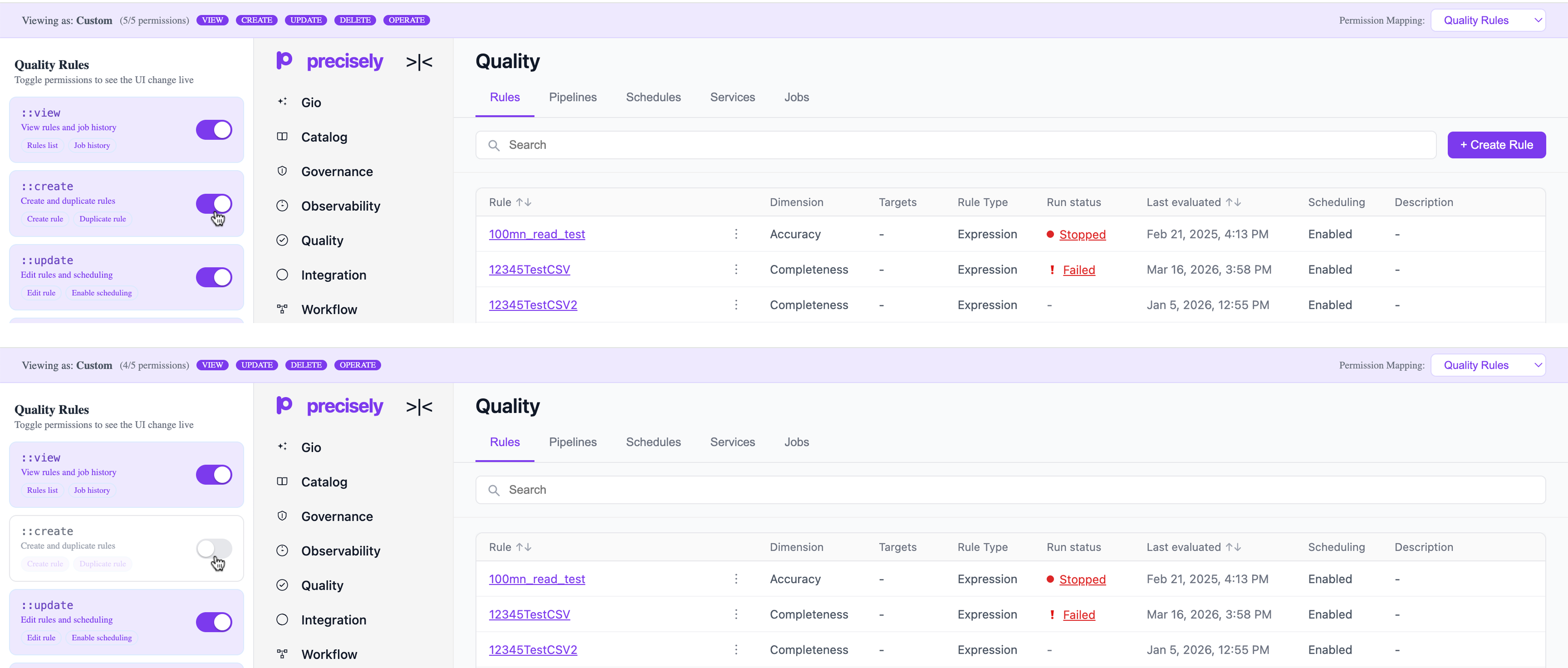
The core decision: hide, don't disable
The most important call in the project was what happens to an action a user isn't authorized for.
Show it, disable it
Leaves users staring at controls they can't use — is it broken? Temporary? Restricted? Every disabled button is a small moment of doubt.
Hide it entirely
The interface only shows what a user can meaningfully do — less clutter, no failed attempts, no ambiguity.
"If a user can't perform an action, they shouldn't need to think about it."
Prototype
Static screens couldn't communicate the number of possible permission states, so a working prototype let different profiles — Quality Designer, Quality Operator, View Only, No Access — be explored live, with the UI updating in real time as permissions toggled.
Design Process
Document every scenario in FigJam
Mapped profiles, permissions, and expected behaviour per domain — the shared source of truth before anything got built.
Build the interactive prototype
Turned documentation into something engineers could click through and validate themselves, instead of interpreting static screens.
Ship View Only behind a feature flag
Owned the View Only implementation in Pipelines, built behind a flag so the existing production experience stayed protected until it was ready.
Validate at the level of individual controls
In Observer, one bell icon's permission mapping was initially unclear — a reminder that permission UX has to be checked control-by-control, not just page-by-page.
Results
For users
- Reduced visual clutter and fewer irrelevant actions
- No dead-end clicks on controls they were never authorized for
- A clearer sense of what they can actually do
For engineering
- A working reference for permission-driven UI, reused across all six domains
- Zero UX blockers raised during implementation
- A reusable pattern rather than a one-off solution
"The best permission experience is one the user doesn't have to think about."